
Checkout Content Manager for WooCommerce
Add Custom Content Anywhere on Your WooCommerce Checkout Page — No Code Required
WooCommerce Checkout Content Manager lets you insert custom HTML, shortcodes, forms, banners, trust badges, and promotional content at any point on your checkout page — all from a simple admin screen. No theme editing, no child themes, no hiring a developer.
Why Store Owners Love It
- Unlimited Content Blocks — Add as many custom sections as you want, even multiple blocks on the same hook location.
- Precise Placement — Choose exactly where your content appears: above billing fields, before the place order button, after order review, and more.
- Priority Control — When you add multiple blocks to the same location, set the display order with simple priority numbers.
- Full Shortcode Support — Drop in Contact Form 7, Gravity Forms, WooCommerce product shortcodes, or any shortcode from your other plugins.
- Reusable Content — Every block gets its own shortcode, so you can reuse the same content elsewhere on your site — sidebars, pages, posts.
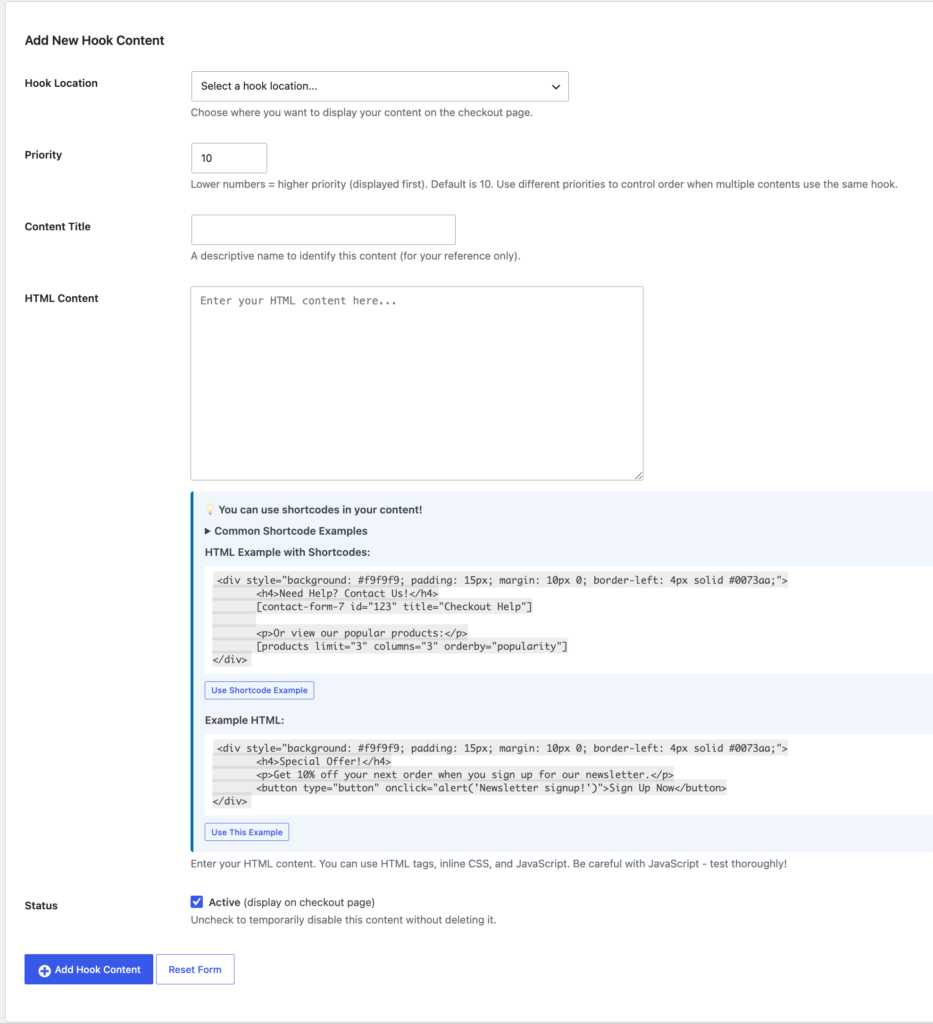
- No Coding Needed — Just pick a location, paste your HTML, and save. Changes appear instantly on your live checkout page.
What Can You Add?
- Trust badges and security seals near the payment button
- Shipping policy notes above the billing form
- Promotional banners or discount reminders before checkout
- Contact forms or live chat prompts for checkout support
- Urgency messaging, countdown timers, or upsell products
- Custom instructions specific to your store or industry
How It Works
- Install and activate the plugin on your WooCommerce store.
- Go to WooCommerce → Checkout Hooks in your dashboard.
- Choose the checkout location where you want your content to appear.
- Paste your HTML (shortcodes welcome) and set a priority.
- Save — your content is live on checkout immediately.
Need it in a second spot too? Repeat the process. Add as many blocks to as many locations as your store needs — there’s no limit.
Built for Store Owners, Not Just Developers
You don’t need to know PHP or understand WordPress action hooks to use this plugin. Every available checkout location is listed in plain language in the dropdown menu — just select, paste your content, and you’re done. If you do know your way around HTML/CSS/JS, you have full creative control over what you add.
Requirements
- WordPress 5.8 or higher
- WooCommerce 5.0 or higher
- PHP 7.4 or higher
- Works with the classic (shortcode-based) WooCommerce checkout
Take full control of your checkout page today — no developer required.